If you want to understand How to Connect Google Ads to Claude, the simplest no-code route is to use a connector that gives Claude authorized access to your advertising data. With WASK, you can connect your Google Ads account, add WASK to Claude, authorize access, and then ask questions about campaign performance in natural language.
Key Takeaways
- How to Connect Google Ads to Claude can be handled through a hosted connector or MCP-based connection.
- Current search results strongly associate this query with Model Context Protocol, connectors, authorization, and no-code setup.
- WASK can act as the connection layer between your Google Ads account and Claude.
- After connecting, focus on spend, CTR, CPC, conversions, CPA, ROAS, keywords, and search terms.
- Use prompts with clear dates, metrics, and objectives.
- Review underlying campaign data before making important changes.
Can You Connect Google Ads to Claude?
Yes. Current results for How to Connect Google Ads to Claude consistently surface hosted MCP connectors as a main connection method. Google’s AI Overview describes authorizing the data source, adding the connector to Claude, and signing in to complete the link.
For a no-code WASK workflow:
Google Ads account → WASK → Claude → campaign analysis
What You Need Before Connecting
Before starting How to Connect Google Ads to Claude, make sure you have access to the Google Ads account you want to analyze, a WASK account with that ad account connected, and access to Claude’s connector functionality.
2 Ways to Connect Google Ads to Claude Without Code
Method 1: Add WASK From the Claude Directory
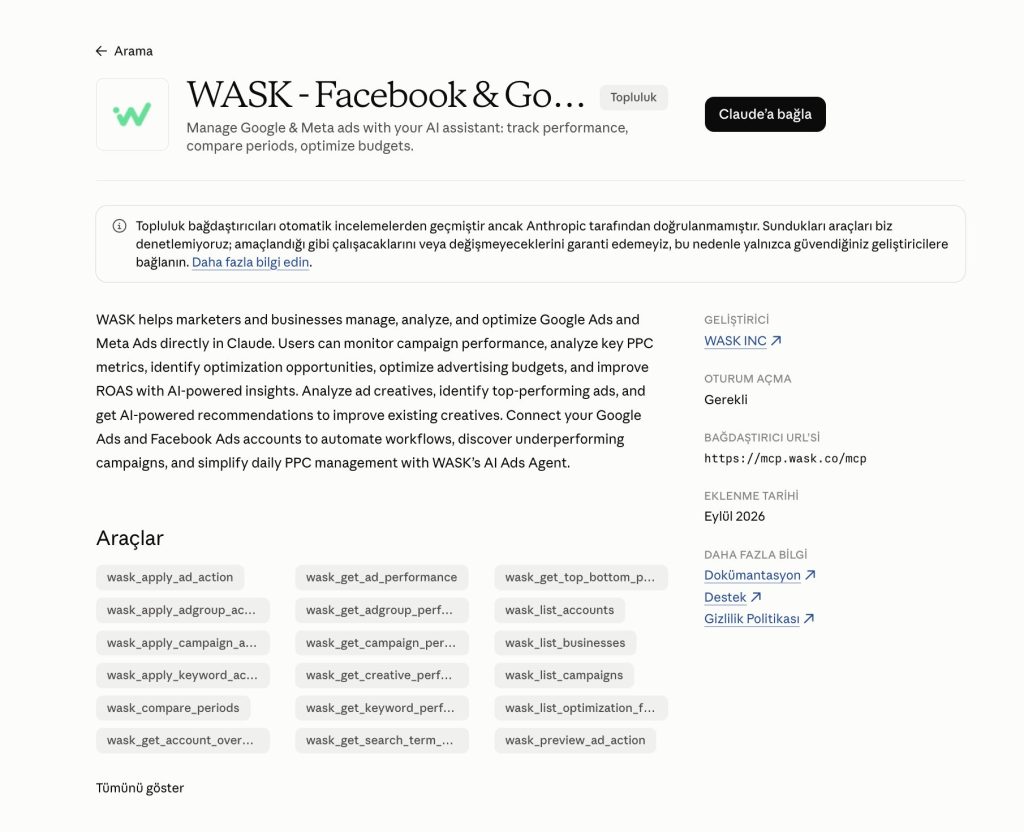
The first route for How to Connect Google Ads to Claude is through the WASK listing in Claude.
Open the WASK connector in the Claude directory, choose the available connection option, and sign in to WASK. Make sure your Google Ads account is already connected inside WASK and complete authorization.
Then open a new Claude conversation and start with a simple request such as:
“Show me my Google Ads campaigns and their performance for the last 30 days.”
Method 2: Connect Through WASK MCP
The second approach to How to Connect Google Ads to Claude is WASK MCP.
Visit the WASK MCP page and follow the current setup instructions. You can also use the WASK custom connector for Claude where available.
MCP, or Model Context Protocol, gives an AI assistant a structured way to interact with connected tools and data. The SERP reinforces this terminology with “Google Ads MCP,” “MCP connector,” and “Connect via Zapier MCP.”
Authorize Your Google Ads Connection
Authorization is an essential part of How to Connect Google Ads to Claude because your advertising account contains private campaign data.
Check which WASK workspace and Google Ads account you are granting access to, complete the sign-in flow, and verify the intended account. Then test the connection with a narrow prompt:
“Show my total spend, clicks, conversions, CPA, and ROAS for the last seven days.”
The Google Ads Metrics That Matter in Claude
A good How to Connect Google Ads to Claude workflow should end with useful analysis, not just a successful connection.
After How to Connect Google Ads to Claude is complete, start with metrics that explain delivery, traffic, efficiency, and conversions.
| Metric | What it tells you |
|---|---|
| Spend | Budget used during the selected period. |
| Impressions | How many times your ads were shown. |
| Reach | How many unique people saw your ads. |
| CTR | How often impressions generated clicks. |
| CPC | Average cost of generating a click. |
| CPM | Cost of 1,000 impressions. |
| Conversions | Tracked actions generated by campaigns. |
| CPA | Average cost of generating a conversion. |
| ROAS | Revenue relative to ad spend when value data is available. |
| Campaign | Campaign associated with the data. |
| Ad set | Audience, delivery, and budget group. |
| Ad | Individual ad associated with performance. |
| Creative | Image, video, or message used in the ad. |
Search results also emphasize tasks such as reviewing search terms, spotting wasted spend, grouping keywords, and comparing time periods.
What to Ask Claude About Your Google Ads Data: Prompt Ideas
The main benefit of How to Connect Google Ads to Claude is being able to explore campaign performance conversationally and follow one finding with another question.
Try prompts such as:
- “Show spend, conversions, CPA, and ROAS by campaign for the last 30 days.”
- “Which campaigns spent the most but generated the lowest ROAS?”
- “Compare the last 30 days with the previous 30 days.”
- “Which campaigns have strong CTR but weak conversion rates?”
- “Find keywords with high spend and no conversions.”
- “Which search terms are generating wasted spend?”
- “Rank my campaigns by CPA and flag the weakest.”
- “Which campaigns increased spend while conversions decreased?”
- “Compare CPC, CPA, and ROAS across my top campaigns.”
- “Summarize the biggest Google Ads changes from the last seven days.”
Natural-language interaction is directly reflected in the SERP, where connector results describe authenticating once and then calling connected tools in natural language.
Why Use a Connector Instead of CSV Uploads?
A CSV can work for a one-off audit, but How to Connect Google Ads to Claude becomes more useful when you want an ongoing workflow.
Manual exports require you to download and upload fresh files whenever the data changes. A connector reduces that repetition and provides a structured route to the advertising data available through the connection.
Still, verify date ranges and underlying metrics before changing bids, budgets, keywords, or campaign settings.
Start Analyzing Google Ads With Claude
Once you understand How to Connect Google Ads to Claude, the workflow is straightforward: connect Google Ads to WASK, add WASK to Claude, authorize the correct account, and start asking focused questions about campaign performance.
Can You Also Use WASK With ChatGPT?
Yes. If your team works across AI assistants, WASK can support a similar workflow with ChatGPT. The basic model remains the same: connect the ad account to WASK, authorize the relevant integration, and ask questions about campaign performance.
Learning How to Connect Google Ads to Claude therefore does not lock you into one assistant.
Frequently Asked Questions
Does Claude connect directly to Google Ads?
Claude needs a supported connection method to work with private Google Ads data. Current results prominently surface MCP connectors and authorization flows.
Do I need to code?
Not necessarily. Current results include no-code and quick-setup approaches, including one result describing a two-click connection.
What can Claude analyze after connecting?
Depending on the data exposed by the connection, you can ask about spend, CTR, CPC, CPA, ROAS, keywords, search terms, campaigns, and period comparisons.
What is Google Ads MCP?
MCP stands for Model Context Protocol. Here, it is the connection layer that lets Claude interact with Google Ads-related tools or data exposed by a compatible server or connector.