If you want to understand how to manage google ads campaigns from chatgpt, the practical workflow is to connect your Google Ads data to ChatGPT through WASK, ask specific performance questions, review the evidence, and use AI-assisted recommendations to guide campaign decisions. Instead of exporting reports or switching between dashboards, you can use natural language to investigate spend, conversions, keywords, ad groups, ROAS, and optimization opportunities while keeping human approval around important changes.
Key Takeaways
- Connect Google Ads to ChatGPT before asking account-specific questions.
- Use AI first for campaign analysis, reporting, and optimization opportunities.
- Review budgets, bidding strategies, keywords, negative keywords, ad groups, and conversions with clear prompts.
- Compare ROAS, CPA, spend, CTR, and conversions before making changes.
- Keep human review around changes that can affect spend or campaign delivery.
What Does Managing Google Ads from ChatGPT Mean?
Learning how to manage google ads campaigns from chatgpt means giving ChatGPT access to relevant Google Ads data through a connected advertising tool such as WASK.
Without a connection, ChatGPT can still help brainstorm ad copy or explain PPC concepts, but it cannot know what is happening inside your account. Once connected, you can analyze performance and work through optimization decisions in plain language. This is the way to manage Google Ads with ChatGPT using account context.
Search intent around how to manage google ads campaigns from chatgpt emphasizes AI campaign management, reporting, optimization, keywords, budgets and campaign creation.
How to Connect Google Ads to ChatGPT
Before testing how to manage google ads campaigns from chatgpt, establish the connection between your advertising account and AI workspace.
1. Connect Your Google Ads Account
Connect the Google Ads account you want to analyze through WASK. If you manage multiple accounts, confirm that you are working with the correct one.
2. Open WASK in ChatGPT
Go to ChatGPT and open the WASK plugin.
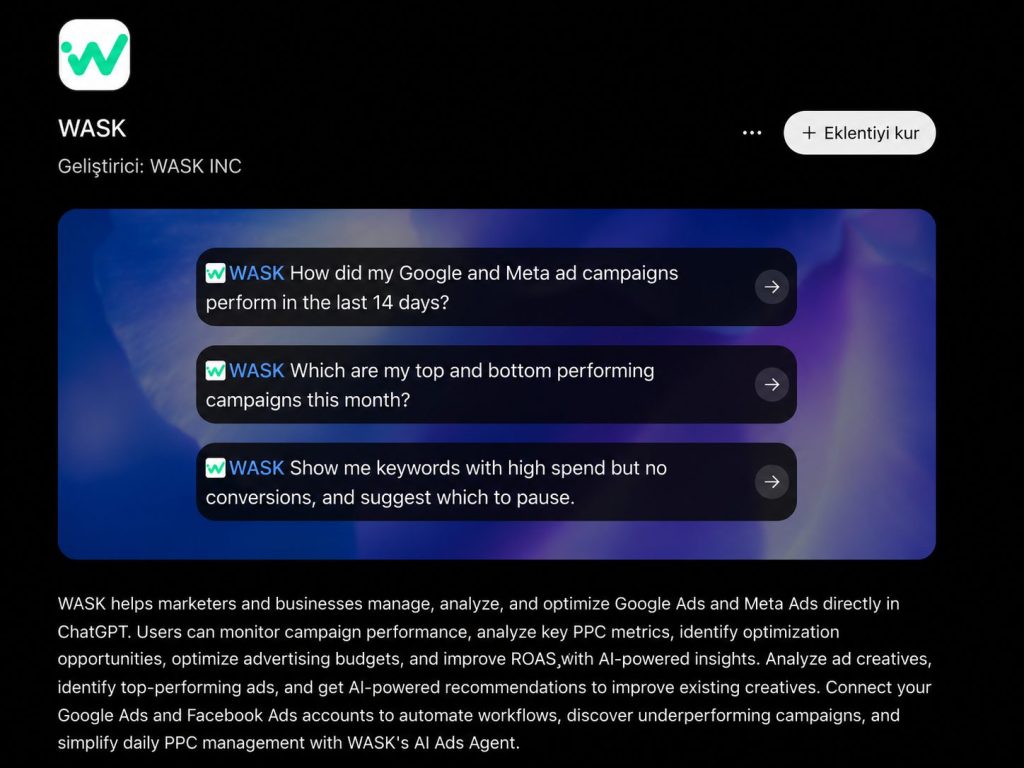
WASK is built to help marketers manage, analyze, and optimize Google Ads and Meta Ads inside ChatGPT. Its current ChatGPT listing highlights campaign-performance monitoring, PPC metric analysis, budget optimization, ROAS improvement, and recommendations for underperforming campaigns.
3. Start With Analysis
A useful rule for how to manage google ads campaigns from chatgpt is to diagnose first and optimize second.
Start with a period comparison. Ask ChatGPT to compare the last 30 days with the previous 30 days and identify which campaigns drove changes in spend, conversions, CPA, CTR, or ROAS.
What Can ChatGPT Help You Manage?
The strongest use cases combine Google Ads campaign management, Google Ads performance analysis, and AI-powered PPC management.
Campaign Performance and Reporting
Use ChatGPT for PPC campaign analysis and Google Ads reporting across multiple campaigns. Ask which campaigns improved or declined and request the metrics behind the answer.
For how to manage google ads campaigns from chatgpt, useful questions include which campaigns have the highest ROAS, which increased spend while conversions fell, and which ad groups caused the largest performance decline.
Campaign Budget Optimization
Campaign budget optimization is more useful when AI has enough context. Ask where spend is concentrated, which campaigns are efficient, and where additional budget may have a stronger return.
Do not evaluate budget only by ROAS. Review conversion volume, CPA, campaign objective, attribution, and business priorities.
Bidding Strategy Review
A bidding strategy affects how Google Ads optimizes toward your goals. ChatGPT can help compare performance across campaigns and highlight where bidding settings deserve review.
When exploring how to manage google ads campaigns from chatgpt, ask for the reasoning and data behind any bidding recommendation before changing it.
Keywords and Negative Keywords
Google Ads keyword management is another strong use case. Ask ChatGPT to find high-spend keywords with no conversions, expensive search terms, or possible negative keyword candidates.
Review search intent before excluding terms. A keyword with weak short-term conversion data may still matter strategically.
Campaign and Ad Group Structure
ChatGPT can also help examine your campaign and ad group structure. Ask whether similar keywords are spread across too many groups, whether campaigns match search intent, or whether a new campaign deserves its own budget. This makes AI Google Ads management useful beyond reporting.
Useful Prompts for Google Ads Management
Prompts are central to how to manage google ads campaigns from chatgpt because vague requests usually produce vague analysis.
Try prompts such as:
| Focus | Prompt for ChatGPT |
|---|---|
| Performance Comparison | Compare ROAS, CPA, spend, and conversions across all active campaigns for the last 30 days. |
| Keyword Analysis | Find keywords with high spend and no conversions. Show campaign, ad group, spend, clicks, and conversion data. |
| Campaign Comparison | Compare my best- and worst-performing campaigns and explain which metrics drive the difference. |
| Budget Review | Review campaign budgets and identify where spend increased faster than conversion value. |
These prompts give ChatGPT a clear scope, time range, and decision goal.
Use a Review-First Workflow
Safe execution matters when learning how to manage google ads campaigns from chatgpt.
A practical workflow is simple: ask ChatGPT to analyze the relevant data, request the exact campaigns and metrics behind the recommendation, review the proposed optimization, confirm only the changes that match your business goal, and monitor results afterward.
WASK’s current MCP flow also positions ChatGPT as a place where advertisers can analyze performance, create campaigns, automate actions, and uncover marketing insights through connected advertising data.
ChatGPT vs. Google Ads
Understanding how to manage google ads campaigns from chatgpt does not mean replacing the Google Ads interface.
ChatGPT is useful for cross-campaign questions, performance explanations, reporting, and prioritizing optimization work. Google Ads remains important for detailed account settings, diagnostics, and final platform-level control.
For how to manage google ads campaigns from chatgpt, the better workflow uses both.
Common Mistakes to Avoid
One mistake is giving AI too little context. Specify a goal, date range, metric, and campaign scope.Another is assuming one metric proves causation. If CPA rises after a budget increase, review search terms, bidding, conversion volume, landing pages, and competition before deciding why.
Finally, do not treat every AI recommendation as an instruction. Google Ads optimization works best when data, automation, and business context support each other.
The value of how to manage google ads campaigns from chatgpt is making account data easier to question, understand, and act on.
Connect reliable data, begin with analysis, use specific prompts, validate the metrics behind recommendations, and keep approval around meaningful changes.
Frequently Asked Questions
Can ChatGPT manage Google Ads campaigns?
With a supported connected app or MCP workflow, ChatGPT can work with Google Ads data and support campaign management, performance analysis, reporting, and optimization. Available actions depend on the connected tool and permissions.
Can ChatGPT analyze my actual Google Ads account?
Yes, when the account is connected through a supported integration. This is the key difference between generic advice and how to manage google ads campaigns from chatgpt using live campaign context.
Can ChatGPT help optimize Google Ads budgets?
Yes. It can help identify budget inefficiencies and highlight campaigns that deserve review. Check the underlying metrics before applying any recommendation.
Is ChatGPT useful for Google Ads keywords?
Yes. It can support keyword analysis, search-term review, negative keyword discovery, campaign organization, and ad messaging.