
If you want to understand How to Connect Meta Ads to Claude, the simplest route is to connect your advertising account through a supported connector or MCP connection. With WASK, you can connect your Meta Ads account, add WASK to Claude, authorize the correct workspace, and then ask questions about campaign performance in natural language. You can also use Meta’s official Ads MCP server where it is available.
Key Takeaways
- How to Connect Meta Ads to Claude can be handled through Meta’s official Ads MCP server or a third-party connector such as WASK.
- The strongest SERP pattern is MCP-based setup: add a connector, authorize Meta access, start a Claude chat, and ask questions about campaign data.
- WASK provides a practical route for bringing connected Meta Ads data into Claude.
- Useful analysis starts with spend, CTR, CPC, conversions, CPA, ROAS, campaigns, ad sets, ads, and creatives.
- Prompts work better when you include a date range, metric, comparison, and objective.
Can You Connect Meta Ads to Claude?
Yes. Current search results for How to Connect Meta Ads to Claude prominently surface Meta’s official Model Context Protocol server as well as third-party directory connectors. Google’s AI Overview describes both approaches and presents MCP as the main connection layer.
For a WASK-based workflow, the structure is simple:
Meta Ads account → WASK → Claude → campaign analysis.
What You Need Before Connecting
Before starting How to Connect Meta Ads to Claude, make sure you have access to the Meta Ads account you want to analyze, a WASK account with that account connected, and access to Claude’s connector functionality.
Also confirm which Meta Business Portfolio, Facebook Page, Instagram account, or ad account you want to authorize.
2 Ways to Connect Meta Ads to Claude Without Code
Method 1: Add WASK From the Claude Directory
The first option for How to Connect Meta Ads to Claude is to use the WASK connector available through Claude.
Open the WASK connector in the Claude directory, choose the available connection option, and sign in to your WASK account. Confirm that the Meta Ads account you want to work with is already connected inside WASK.
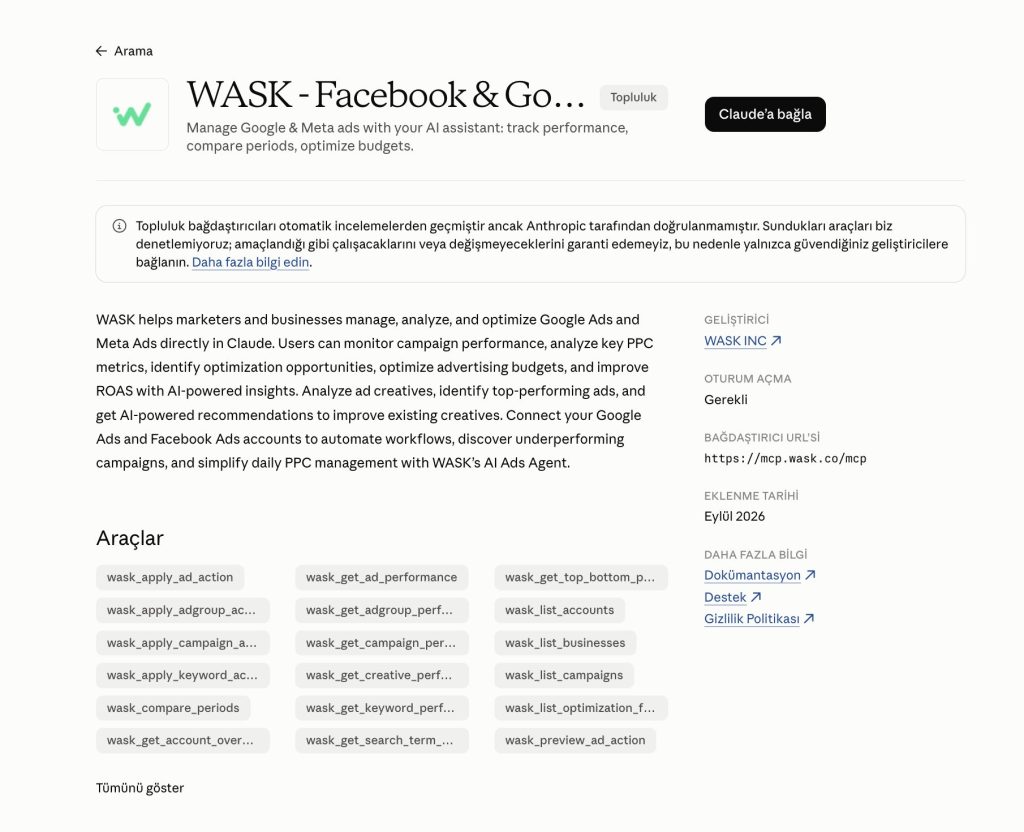
Then open a new Claude conversation and try: “Show me my Meta Ads campaigns and summarize performance for the last 30 days.”
Method 2: Connect Through WASK MCP
The second route for How to Connect Meta Ads to Claude is WASK MCP.
Open the WASK MCP page and follow the current connection instructions. You can also use the WASK custom connector for Claude when available.
MCP, or Model Context Protocol, gives AI assistants a structured way to work with connected tools and data.
What About Meta’s Official Ads MCP?
A complete guide to How to Connect Meta Ads to Claude should also mention Meta’s official option.
The current SERP shows Meta’s Ads MCP server as an official connection method. Google’s AI Overview describes opening Claude connector settings, adding a custom connector, entering Meta’s remote MCP server, connecting the account, and selecting the business assets Claude can access.
Meta’s own result points users to Meta Business Suite → Settings → Integrations → Ads MCP server. Availability may vary by account.
Authorize Your Meta Ads Account
Authorization is an important part of How to Connect Meta Ads to Claude because advertising data is private and account-specific.
Check which WASK workspace and Meta Ads account you are linking, review the requested permissions, and verify the selected assets before finishing authentication.
Then test the connection with:
“Show my spend, conversions, CPA, and ROAS for the last seven days.”
The Meta Ads Metrics That Matter in Claude
After How to Connect Meta Ads to Claude is complete, focus on metrics that explain delivery, traffic, conversion efficiency, and return.
What to Ask Claude About Your Meta Ads Data: Prompt Ideas
The main value of How to Connect Meta Ads to Claude comes after setup. Give Claude a clear timeframe, metric, and objective instead of asking a broad question like “How are my ads doing?”
Try prompts such as:
- “Show spend, conversions, CPA, and ROAS by campaign for the last 30 days.”
- “Which campaigns spent the most but generated the lowest ROAS?”
- “Compare the last 30 days with the previous 30 days.”
- “Which ad sets have strong CTR but weak conversion performance?”
- “Which ads have the highest CPA?”
- “Compare my top-performing and bottom-performing creatives.”
- “Which campaigns increased spend while conversions decreased?”
- “Where should I investigate wasted budget first?”
- “Summarize the biggest Meta Ads changes from the last seven days.”
- “Which campaigns should I review first if my goal is to improve ROAS?”
You can then follow up with questions such as “Which ad sets caused the decline?” or “Did CTR, CPC, or conversion rate change the most?”
Why Use a Connector Instead of Manual Exports?
A CSV can work for a one-time review, but How to Connect Meta Ads to Claude becomes more useful when you want a repeatable workflow.
Manual exports require you to download and upload fresh files whenever data changes. A connector gives Claude a structured route to the advertising information available through the connection.
For important budget or campaign decisions, verify the underlying metrics before applying changes.
Start Analyzing Meta Ads With Claude
Once you understand How to Connect Meta Ads to Claude, the workflow is straightforward: connect Meta Ads to WASK, add WASK to Claude, authorize the correct account, and start asking focused questions about campaign performance.
Frequently Asked Questions
Does Claude connect directly to Meta Ads?
Claude needs an authorized connection to private Meta Ads data. Meta provides an official Ads MCP server, while third-party connectors can provide another route.
Do I need to code?
Not necessarily. The current SERP strongly features no-code connector and MCP workflows. One ranking result even uses the exact “2 Ways, No Code” positioning.
What can Claude analyze after connecting Meta Ads?
Depending on the data exposed by the connection, you can ask about spend, impressions, reach, CTR, CPC, CPM, conversions, CPA, ROAS, campaigns, ad sets, ads, creatives, and period comparisons.
Can Claude make changes to Meta Ads?
That depends on the connector, permissions, and available tools. The current SERP notes that changes created through Meta’s official connector may default to a paused state until manually reviewed and activated.