How to Manage Facebook Ads Campaigns from ChatGPT is becoming a practical question for advertisers who want to spend less time switching between dashboards and more time making decisions.
The simplest approach is to connect your Facebook Ads data to ChatGPT through a supported connector such as WASK MCP Once connected, ChatGPT can work with real campaign context, helping you analyze performance, compare campaigns, identify inefficient spend, review creatives, and make better optimization decisions using natural-language prompts.
With the right setup, ChatGPT for Facebook Ads becomes more than a copywriting tool. It can become a conversational layer for Facebook Ads campaign management.
Quick Answer: Connect your Meta Ads account to WASK, connect WASK to ChatGPT through WASK MCP or the supported ChatGPT integration, authorize access, and then use natural-language prompts to analyze campaigns, budgets, ad sets, creatives, conversions, and other performance data.
Key Takeaways
- ChatGPT needs access to your advertising data before it can analyze real Facebook Ads campaigns.
- WASK MCP can connect supported Meta Ads data directly to ChatGPT.
- You can use ChatGPT to review campaign performance, spend, ROAS, CPA, CTR, CPC, conversions, and other metrics.
- WASK can also monitor Meta campaigns with AI Agents and surface optimization recommendations for approval.
What Does It Mean to Manage Facebook Ads from ChatGPT?
This is the core idea behind How to Manage Facebook Ads Campaigns from ChatGPT: give the AI reliable advertising context, then use conversation to move from raw campaign data to decisions.
Using ChatGPT adds a conversational layer on top of that data. Instead of manually filtering campaigns and comparing dozens of metrics, you can ask questions such as:
- Which campaigns generated the highest ROAS in the last 30 days?
- Which ad sets are spending the most without converting?
- Where is my campaign budget being wasted?
- Which campaigns should I review before increasing spend?
Google’s current search results reflect the same intent, emphasizing Facebook Ads, ChatGPT, campaign management, spend, conversions, and performance analysis.
How to Manage Facebook Ads Campaigns from ChatGPT Step by Step
1. Connect Your Meta Ads Account to WASK
Start by connecting the Facebook Ads account you want to work with to WASK. This gives WASK access to the advertising data required for campaign analysis and optimization.
Your account contains several levels of data that matter when working with AI:
Campaign → Ad Set → Ad → Creative
Each level answers different questions. Campaign-level data helps evaluate overall objectives and budgets. Ad sets provide targeting and delivery context.
2. Connect WASK to ChatGPT
Next, connect WASK to ChatGPT using WASK MCP.
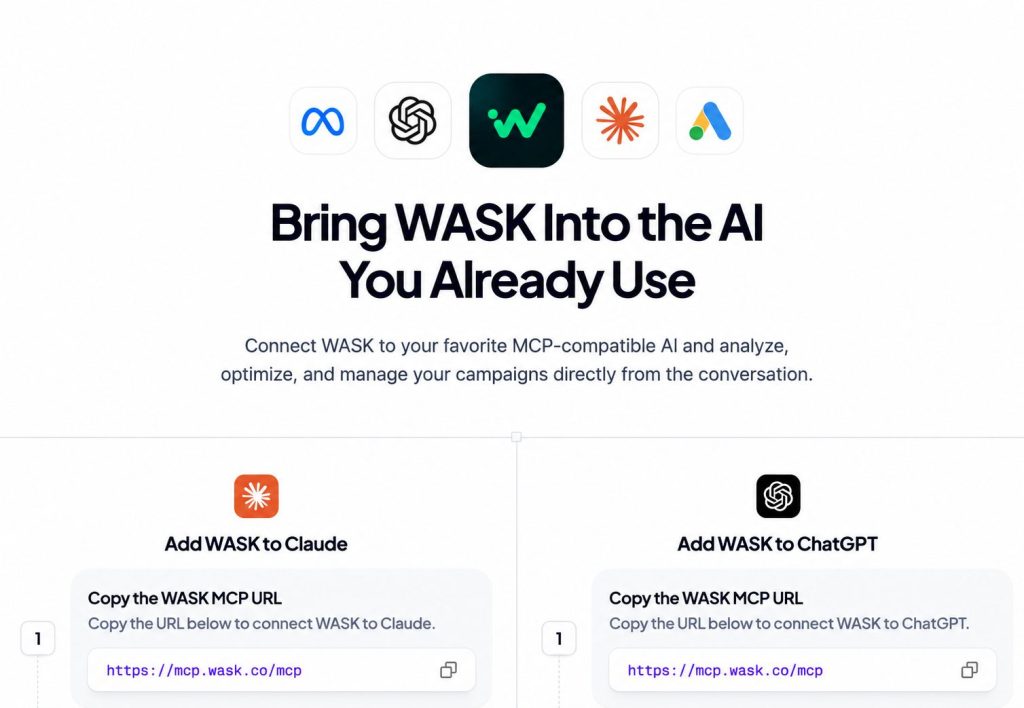
Once the connection is active, How to Manage Facebook Ads Campaigns from ChatGPT becomes a much more practical workflow because ChatGPT can work with real advertising context instead of generic assumptions.
3. Start With Campaign Analysis
Do not begin by asking AI to change your campaigns.Begin with diagnosis. A useful first prompt could be:
“Analyze my Facebook Ads campaigns from the last 30 days. Compare spend, ROAS, CPA, CTR, CPC, conversions, and cost per result. Identify the three campaigns that need attention first and explain why.“
Campaign analysis is a central part of How to Manage Facebook Ads Campaigns from ChatGPT because it helps establish what is actually working before optimization decisions are made.
4. Identify Underperforming Campaigns
Once ChatGPT understands the account, narrow the analysis. This is much more useful than simply asking:
“Which campaigns are bad?”
A campaign may appear inefficient because of higher CPM, weak CTR, poor conversion rates, creative fatigue, limited audience size, or an unsuitable optimization goal.
What Facebook Ads Data Can ChatGPT Analyze?
When connected to the right data source, ChatGPT can help interpret many of the metrics advertisers already use inside Meta Ads Manager. These can include:
| Metric | What It Helps You Understand |
|---|---|
| Spend | How much budget a campaign is consuming |
| Impressions | How often ads are being delivered |
| CTR | How effectively ads generate clicks |
| CPC | How expensive those clicks are |
| Conversions | How many desired actions were generated |
| CPA | How much each conversion costs |
| ROAS | How much revenue is generated relative to ad spend |
| Cost per result | Efficiency based on the campaign objective |
| Reach | How many unique users saw the ads |
| Frequency | How often the same audience is seeing the ads |
Understanding which metrics are available is essential to How to Manage Facebook Ads Campaigns from ChatGPT effectively.
Best ChatGPT Prompts for Facebook Ads Campaign Management
Good prompts are one of the most important parts of How to Manage Facebook Ads Campaigns from ChatGPT, since specific questions generally produce more actionable answers.
Campaign Performance
“Compare my active Facebook Ads campaigns over the last 30 days. Rank them by ROAS and CPA, then identify unusual changes in spend, CTR, CPC, or conversions.”
Budget Optimization
“Review my active campaigns and identify where budget appears inefficient. Show campaigns that may deserve more budget and campaigns that should be reviewed before additional spend.”
Ad Set Analysis
“Compare the ad sets inside my highest-spending campaign. Which ad sets have the strongest and weakest cost per result, CTR, and conversion performance?”
How to Optimize Facebook Ads Budgets With AI
One of the strongest use cases for AI for Facebook Ads is budget analysis. Instead of checking every campaign manually, ChatGPT can help compare performance and identify possible budget inefficiencies.
Budget analysis is another practical part of How to Manage Facebook Ads Campaigns from ChatGPT, especially when several campaigns compete for the same advertising budget.
How to Analyze Facebook Ads Performance With ChatGPT
A strong Facebook Ads optimization process starts with understanding the overall account performance before focusing on individual campaigns, ad sets, and creatives.
ChatGPT can help identify where the biggest changes are happening, which campaigns are contributing most to those shifts, and whether the underlying issue comes from targeting or conversions.
A structured performance review makes How to Manage Facebook Ads Campaigns from ChatGPT more reliable by connecting recommendations to actual campaign metrics.
Can ChatGPT Actually Make Changes to Facebook Ads?
A key consideration in How to Manage Facebook Ads Campaigns from ChatGPT is understanding the difference between analyzing data and executing changes through an authorized integration.
For important actions such as changing a campaign budget, pausing an ad set, or modifying campaign settings, review the underlying conversion data and recommendation before applying the change.
ChatGPT vs. Meta Ads Manager
ChatGPT and Meta Ads Manager serve different purposes. Meta Ads Manager remains the underlying advertising platform where your Facebook and Instagram campaigns operate.
| Meta Ads Manager | ChatGPT |
|---|---|
| Stores campaign configuration | Interprets campaign information |
| Displays raw metrics | Explains performance changes |
| Provides reporting tools | Answers natural-language questions |
| Controls campaigns directly | Helps diagnose and prioritize actions |
| Requires dashboard navigation | Enables conversational analysis |
ChatGPT helps you understand what deserves attention. Meta and connected tools provide the advertising infrastructure needed to execute those decisions.
How WASK Helps Manage Facebook Ads With AI
WASK adds the advertising-specific data and workflow needed to make How to Manage Facebook Ads Campaigns from ChatGPT useful for real campaign management.
Combined with ChatGPT through WASK MCP, this creates a workflow where advertisers can use conversational AI while keeping real advertising data connected to the process.
Ultimately, How to Manage Facebook Ads Campaigns from ChatGPT comes down to combining accurate Meta Ads data, clear prompts, and informed human review.
Can You Manage Facebook Ads With Claude Too?
ChatGPT is not the only AI assistant that can work with advertising data. If you also use Claude, the underlying workflow is similar: connect supported Meta advertising data, provide campaign context, analyze performance, and review optimization recommendations.
Read our guide on how to manage Facebook Ads campaigns from Claude to compare the workflow.
Manage Facebook Ads With AI
Learning How to Manage Facebook Ads Campaigns from ChatGPT is mainly about giving AI the right data and asking the right questions.
Connect your Meta Ads account through a supported solution such as WASK, start with campaign performance analysis, move from campaigns to ad sets and ad creatives, and use metrics such as ROAS, CPA, CTR, CPC, conversions, and cost per result to guide decisions.
ChatGPT can make Facebook Ads management faster and easier to understand. WASK adds the advertising-specific layer needed to connect data, surface optimization opportunities, and turn AI insights into practical campaign decisions.
Frequently Asked Questions
Can ChatGPT manage Facebook Ads?
Yes, but access depends on the connection being used. ChatGPT needs an authorized integration, app, connector, or MCP setup to work with private Facebook Ads data.
Can ChatGPT analyze Facebook Ads performance?
Yes. With connected campaign data, ChatGPT can help analyze metrics including spend, CTR, CPC, CPM, conversions, CPA, ROAS, and cost per result.
Can ChatGPT optimize Facebook Ads budgets?
ChatGPT can analyze budget efficiency and identify potential reallocation opportunities. Significant budget changes should still be reviewed using current campaign data before implementation.
Can ChatGPT access Meta Ads automatically?
No. ChatGPT does not automatically have access to your private Facebook Ads account. You must authorize access through a supported connection.
What is the best way to use ChatGPT for Facebook Ads?
Start with campaign analysis, identify the source of performance problems, compare campaigns and ad sets, then request specific optimization recommendations based on measurable goals.