
If you want to know how to manage Facebook Ads campaigns from Claude, the practical answer is to connect your Meta Ads data to Claude through a tool such as WASK MCP, then use natural-language prompts to analyze performance, compare metrics, and move from insight to optimization. The goal is not to replace Meta Ads Manager. It is to give Claude reliable campaign context so it can help you make faster decisions while you keep control over changes.
Key Takeaways
- Claude can become a working layer for Meta Ads analysis when connected to the right advertising data.
- WASK MCP connects supported Google and Meta advertising data with MCP-compatible AI assistants.
- Start with diagnosis before asking AI to help with campaign changes.
- Focus on ROAS, CPA, CTR, conversions, spend, and cost per result.
- Review AI recommendations before applying budget, bidding, creative, or campaign changes.
What Does Managing Facebook Ads from Claude Mean?
Learning how to manage Facebook Ads campaigns from Claude means using Claude as a conversational interface for campaign analysis and management instead of opening multiple reports for every question.
A connected workflow can combine Meta Ads campaign management, Facebook Ads performance analysis, and AI ad campaign management. You can ask, “Which campaigns lost ROAS this week?” or “Which ad sets have the highest CPA compared with the previous 30 days?”
Claude does not remove the need for Meta Ads Manager. It becomes an additional decision layer that helps you interpret campaign data and organize the next action.
What You Need Before You Start
Before testing how to manage Facebook Ads campaigns from Claude, make sure you have access to the Meta Ads account you want to analyze and a Claude account.
You also need a secure connection to advertising data. WASK MCP connects WASK with MCP-compatible AI tools so advertisers can analyze, optimize, and manage campaigns from the conversation. WASK also supports performance analysis, campaign creation, marketing insights, and automation.
How to Connect Facebook Ads to Claude
The first step in how to manage Facebook Ads campaigns from Claude is establishing the data connection.
1. Connect Your Meta Ads Account to WASK
Connect the Meta advertising account you want to work with inside WASK. This gives Claude a data foundation for campaign questions.
2. Add WASK to Claude
Open Claude and add WASK through the available connector flow. You can also access WASK in the Claude directory.
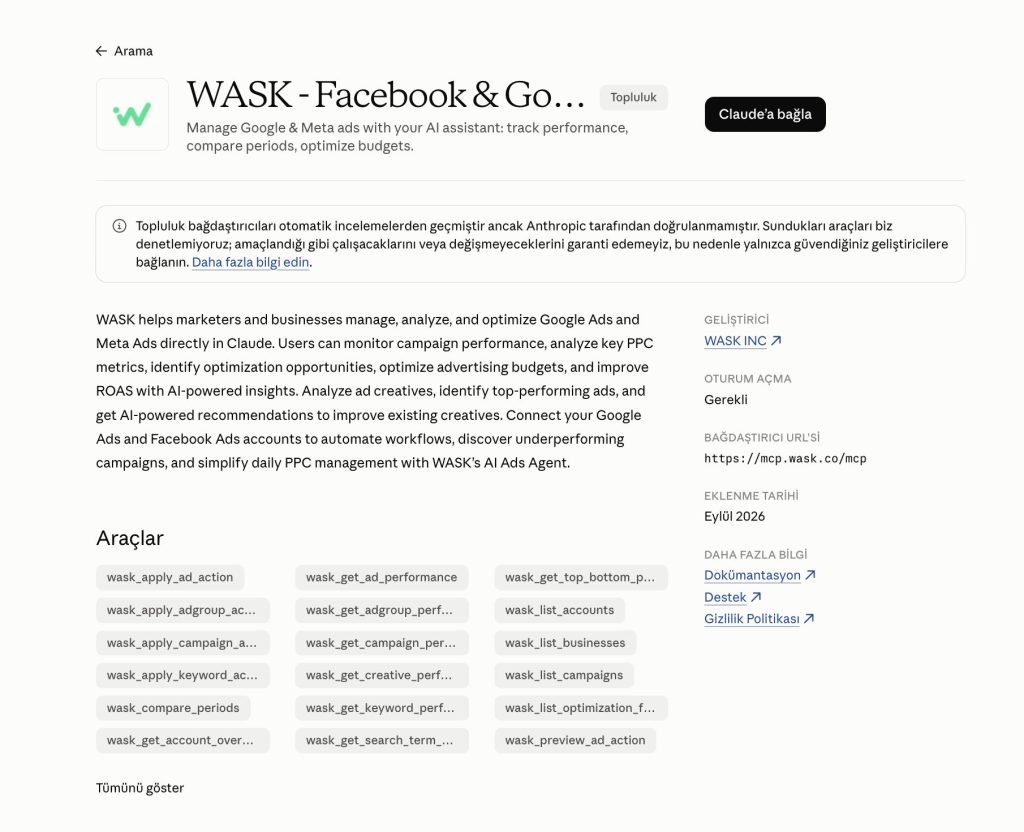
WASK’s MCP setup also supports adding a custom connector in Claude, authorizing WASK, and then accessing supported advertising data from the conversation.
3. Start With Analysis
When learning how to manage Facebook Ads campaigns from Claude, begin by asking Claude to explain performance before requesting any action.
Useful prompts include:
| Focus | Prompt for Claude |
|---|---|
| ROAS Comparison | Compare campaign ROAS for the last 30 days with the previous 30 days. |
| CPA Analysis | Show the ad sets with the highest CPA and explain what changed. |
| Spend & Conversions | Which active campaigns increased spend while conversions declined? |
| Metric Comparison | Compare CTR, CPM, CPA, and ROAS across my top campaigns. |
This helps you verify that Claude is reading the expected account and interpreting the metrics correctly.
What Can You Manage With Claude?
A useful way to approach how to manage Facebook Ads campaigns from Claude is to separate analysis from execution.
Analyze Campaign Performance
Ask Claude to summarize spend, impressions, clicks, CTR, CPA, conversions, and ROAS. You can also compare periods to spot meaningful changes.
WASK MCP specifically supports performance analysis across connected campaigns, including comparing key metrics across periods and identifying campaigns that need attention.
Review Budgets and Ad Sets
Campaign budget management is another useful case. Claude can help you identify where spend is concentrated, which ad sets are stronger, and where efficiency is falling.
When considering how to manage Facebook Ads campaigns from Claude, do not move money because one metric changed for a single day. Review enough data to understand whether the change is meaningful.
Evaluate Ad Creatives
Ad creative performance can help explain why CTR falls or CPA rises. Ask Claude to compare creatives, identify weaker ads, and summarize patterns among stronger variations.
These findings can then feed into broader Facebook Ads optimization.
Use Claude for Decisions, Not Blind Automation
The biggest mistake in how to manage Facebook Ads campaigns from Claude is treating every AI recommendation as an instruction that must be executed.
Use a review-first workflow:
| Step | Action |
|---|---|
| 1 | Ask Claude to analyze the campaign. |
| 2 | Ask it to explain why a change may be needed. |
| 3 | Review the affected campaign, ad set, budget, or creative. |
| 4 | Confirm the action only when it matches your business goal. |
| 5 | Measure what happened after the change. |
This matters most for budget changes, bidding decisions, campaign creation, and anything that can increase ad spend.
Turn Claude Insights Into Facebook Ads Optimization
Understanding how to manage Facebook Ads campaigns from Claude is useful only if the insights improve performance.
If Claude identifies high CPA, weak engagement, inefficient budget allocation, or underperforming placements, the next step is optimization.
WASK’s Facebook Ads Optimization workflow includes budget optimization, bidding optimization, ad text optimization, placement optimization, landing-page checks, and performance insights.
Claude helps you understand what is happening, while WASK gives you a structured environment for acting on those findings.
How WASK MCP Fits Into the Workflow
For advertisers researching how to manage Facebook Ads campaigns from Claude, WASK MCP acts as the bridge between the AI conversation and advertising data.
A simple workflow is:
Meta Ads account → WASK → WASK MCP → Claude → campaign analysis → optimization decision
Claude can answer questions using connected campaign information instead of relying only on manually copied screenshots, exported CSV files, or isolated metrics.
WASK positions MCP specifically as a way to bring campaign analysis, optimization, management, campaign creation, automation, and marketing insights into supported AI assistants.
Best Practices for Managing Meta Ads With AI
As you learn how to manage Facebook Ads campaigns from Claude, keep the prompts specific. Include a date range, metric, campaign scope, and the decision you are trying to make.
Ask Claude to show the evidence behind a recommendation. Avoid making several major campaign changes at once, because you may lose the ability to understand what caused the result.
Business context still matters. Claude can work with performance data, but you still know whether the campaign supports a product launch, seasonal promotion, lead-generation target, or profitability goal.
The value of how to manage Facebook Ads campaigns from Claude is reducing the distance between a performance question and a useful answer.
Connect reliable campaign data, begin with analysis, use clear prompts, review recommendations, and turn strong insights into controlled optimization. With Claude, WASK MCP, Meta Ads reporting, and Facebook Ads optimization, AI can become a practical part of everyday campaign management.
Frequently Asked Questions
Can Claude manage Facebook Ads campaigns?
When Claude is connected to supported advertising data and campaign-management tools, it can assist with campaign analysis and supported management workflows. Available actions depend on the connector and permissions you use.
Do I still need Meta Ads Manager?
Yes. Knowing how to manage Facebook Ads campaigns from Claude does not mean replacing Meta Ads Manager. Claude is best used as an AI interface for analysis, decision support, and connected campaign workflows.
Can Claude optimize Facebook Ads automatically?
Claude can help identify optimization opportunities, but campaign changes should still follow a review process. Keep control over budgets, bidding, targeting, and creative decisions.
Related Reading